Single-Node CyberSec Lab: Firewall
Table of contents
Where We Left Off
First post covered the architecture design. This one covers everything from blank OPNsense VM to enforced security architecture. Single Proxmox node, Open vSwitch, OPNsense as the only L3 router, five VLANs through one physical cable.
This documents what I actually did, including the parts that did not go as expected. Because they never do. :p
Building the Foundation
Before touching OPNsense I needed two OVS bridges in Proxmox.
vmbr0 is the transport plane. Every VM I deploy connects here tagged with its VLAN ID. All inter-VLAN traffic flows through OPNsense via this bridge.
vmbr1 is the passive TAP. No IP, no uplink, no routing. Created purely as a destination for mirrored frames from vmbr0. When the SIEM goes in, it will listen here in promiscuous mode and see everything crossing the lab network without being in the traffic path.
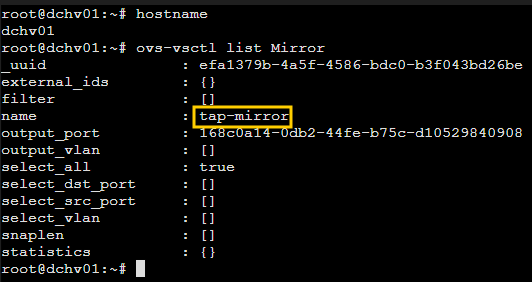
I wired them together with a port mirror and made it survive reboots
by adding the command as a post-up directive on vmbr1 in
/etc/network/interfaces:
ovs-vsctl \
  -- --id=@vmbr1 get Port vmbr1 \
  -- --id=@m create Mirror name=tap-mirror \
  select-all=true \
  output-port=@vmbr1 \
  -- set Bridge vmbr0 mirrors=@m
With the bridges up, I deployed OPNsense. Two things matter most during VM creation: OS type and network configuration.
Guest OS type set to Other. OPNsense is FreeBSD, not Linux. Proxmox uses the OS type to make optimization decisions and getting this wrong applies incorrect kernel assumptions that affect performance in ways that are hard to diagnose later.
Two VirtIO NICs, both on vmbr0. net0 tagged VLAN 100 for the WAN handoff from MikroTik. net1 with no tag as the LAN trunk for all lab VLANs. Proxmox Firewall unchecked on both. OPNsense is the firewall. Two independent filtering layers on the same traffic path creates problems.
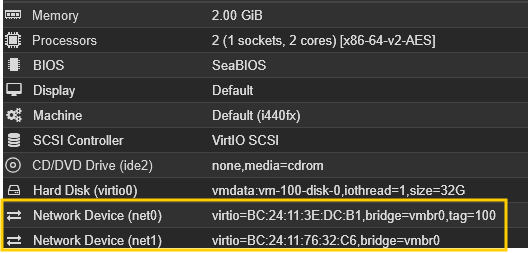
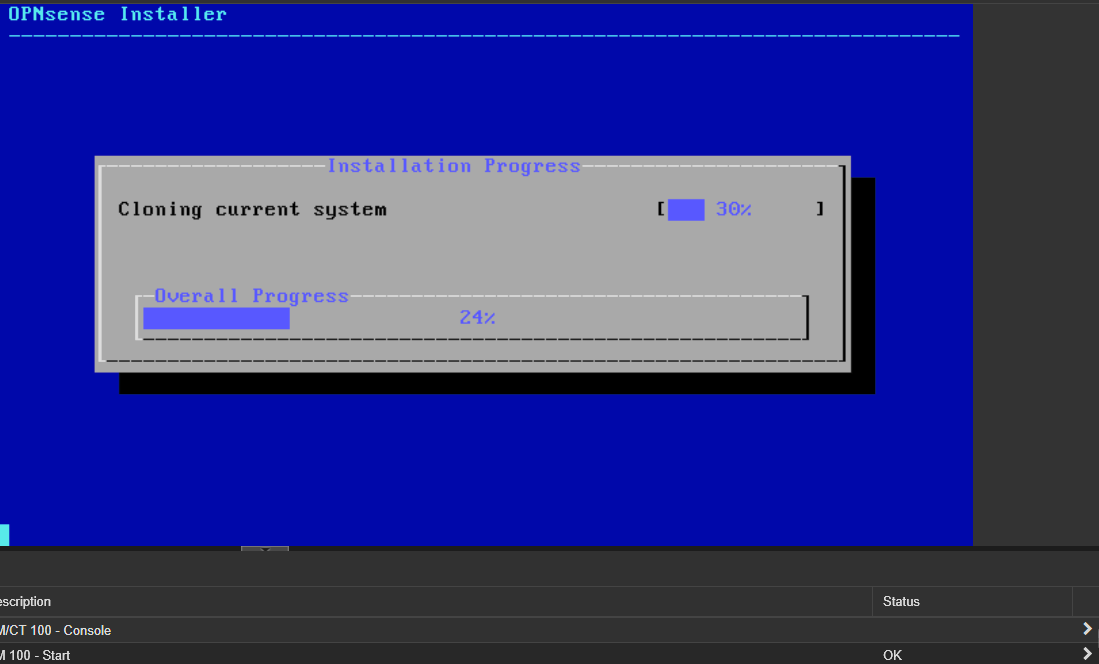
I added the second NIC before the first boot so OPNsense could identify both interfaces correctly during installation. First boot had them swapped anyway. OPNsense assigned vtnet0 as LAN and vtnet1 as WAN, the opposite of what I needed. Option 1 on the console menu fixed it in about thirty seconds.

Configuring the Network
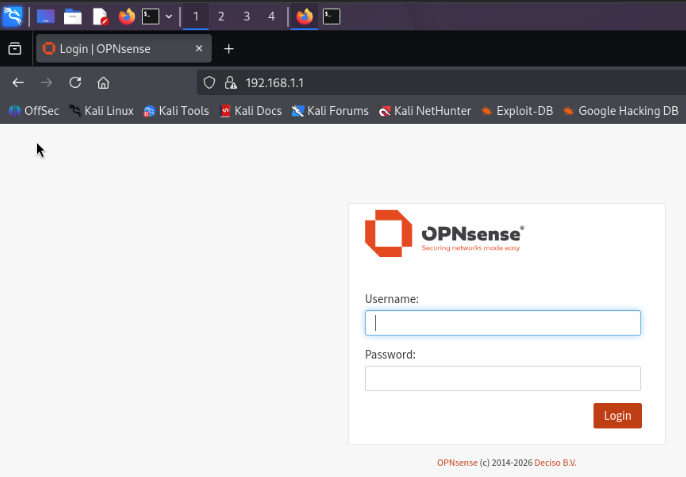
With OPNsense running I needed to reach the web UI to configure everything else. The UI is only reachable from a device on its LAN subnet. I had no VMs deployed yet and my M900 at 10.10.10.56 lives on a completely different subnet.
My fix was to deploy Kali early with no VLAN tag. No tag means it sits on the same untagged segment as OPNsense’s LAN interface inside OVS, communicating entirely within the hypervisor. Kali picked up 10.10.10.251 from MikroTik’s DHCP instead of landing on OPNsense’s LAN subnet, so I set a manual static address to get in:
sudo ip addr add 192.168.1.50/24 dev eth0
sudo ip route add default via 192.168.1.1
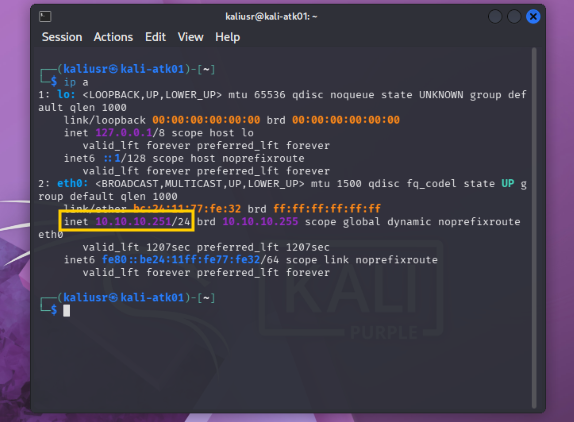
Temporary address, not meant to survive a reboot. Ping to 192.168.1.1 confirmed the path and I was in.
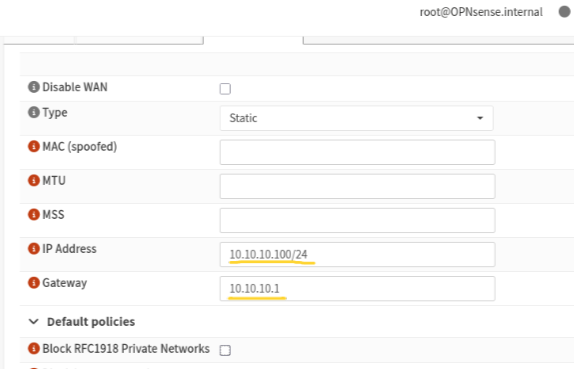
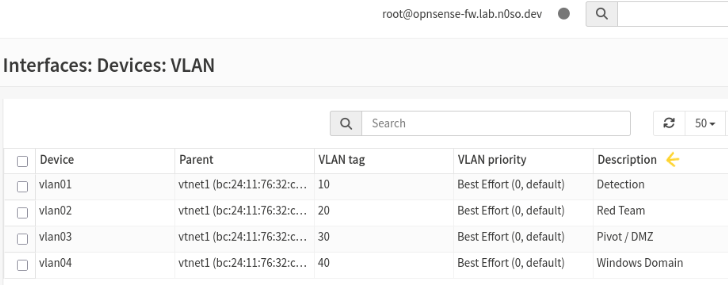
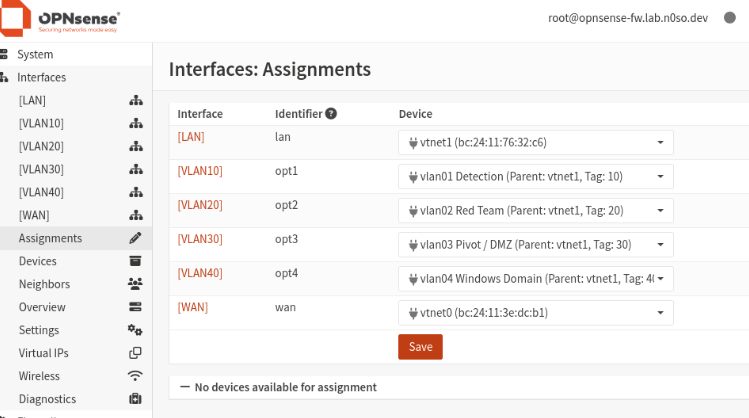
From there the configuration followed the architecture diagram directly. WAN static IP, VLAN sub-interfaces parented on vtnet1, each assigned and given its gateway address. OPNsense is now the L3 router for every lab segment simultaneously through a single trunk interface.
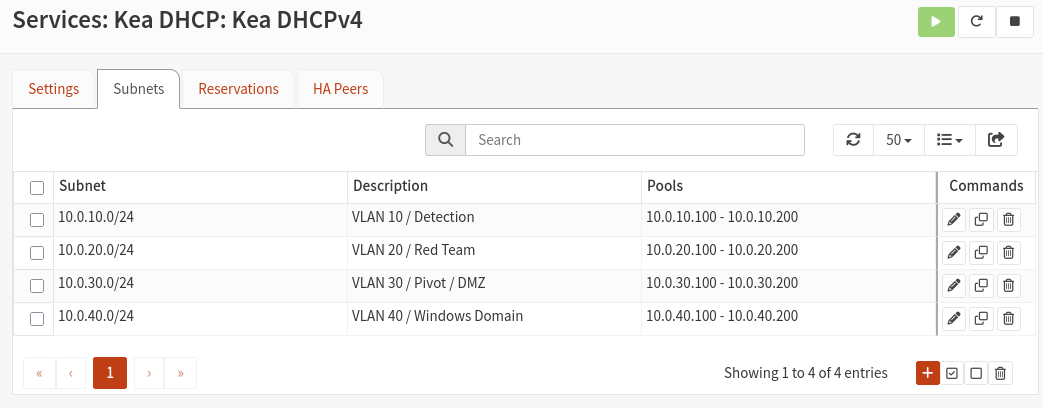
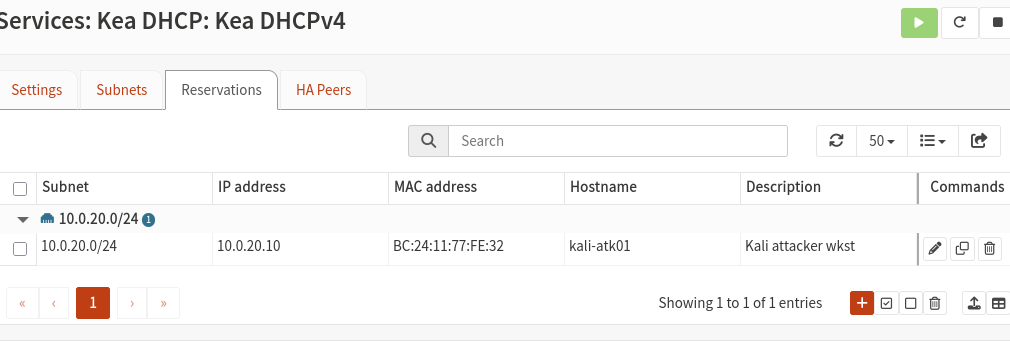
For DHCP I used Kea with a dedicated subnet per VLAN, pool from .100 to .200, and static MAC-to-IP reservations for every VM. The lower range is reserved for infrastructure. Firewall rules and Wazuh alerts reference specific IPs. If those addresses change, detection logic breaks silently. Static mappings prevent that.
This is where the smooth part of the build ended. :p
What Broke
The OVS Trunk Problem
I set Kali’s VLAN tag to 20 in Proxmox and booted it up. DHCP discover was going out. Nothing was coming back. I jumped on the Proxmox host and ran tcpdump to see what was actually happening on the wire:
tcpdump -i tap100i1 -n -e port 67 or port 68
Discovers were arriving tagged VLAN 20. No offer. OPNsense was seeing the packets and staying silent.
My first instinct was OPNsense misconfiguration. It was not. The problem was OVS. When I left net1 without a VLAN tag in the Proxmox UI, the pve-bridge script attached it to vmbr0 as a plain untagged port. So when Kali sent a frame tagged VLAN 20, it hit the bridge and went nowhere. OPNsense’s tap interface was not listening for tagged frames at all.
ovs-vsctl list port tap100i1
# trunks: []
Empty. That is the whole problem right there. I had to explicitly configure the trunk after OPNsense was already running:
qm set 100 --net1 "virtio=BC:24:11:76:32:C6,bridge=vmbr0,trunks=10;20;30;40"
I verified with ovs-vsctl list port tap100i1
and confirm trunks: [10, 20, 30, 40]. Without this, no VM on any
lab VLAN will ever communicate with OPNsense.
The Kea DHCP Problem
Trunk fixed. DHCP still broken. Kea was running, the discover was arriving, and there was still no offer coming back. I pulled the Kea log to see what it was complaining about:
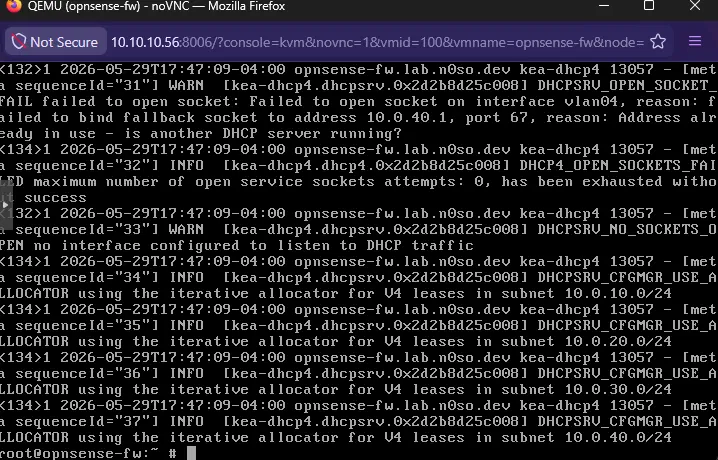
WARN DHCPSRV_OPEN_SOCKET_FAIL failed to open socket on interface
vlan01, reason: failed to bind fallback socket to address 10.0.20.1,
port 67, reason: Address already in use
dnsmasq. It had bound to port 67 on every interface before Kea even had a chance. Kea was configured correctly the whole time. It just had no ears because dnsmasq had already taken the port it needed.

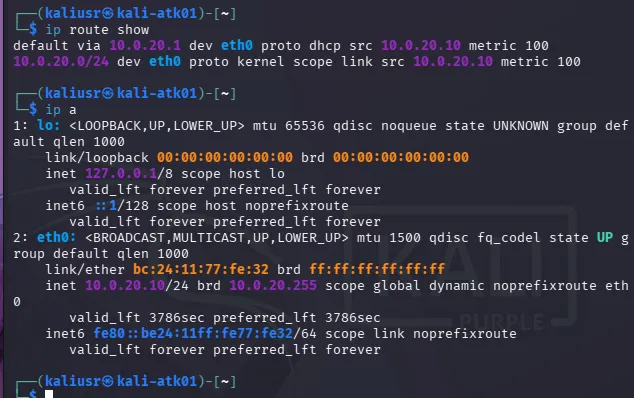
Stopping dnsmasq freed port 67 and Kea picked it up immediately across all four VLAN interfaces.
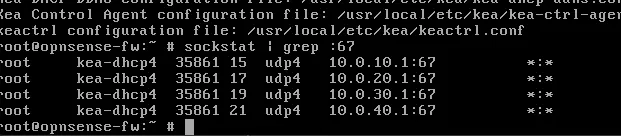
Kali got 10.0.20.10 on the next DHCP lease.
The WAN Segmentation
I thought the hard part was over. Then I tried to verify end-to-end connectivity and spent the better part of a night finding out why the architecture I thought I had built was not the architecture that actually existed.
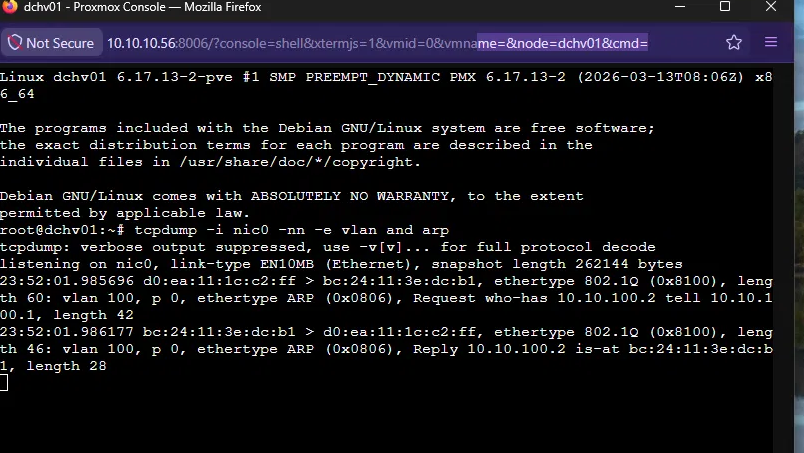
While tracing a management access problem I ran tcpdump on the Proxmox host and noticed something that should have been obvious earlier.
tcpdump -i nic0 -nn -e vlan and arp
OPNsense was sending ARP requests tagged VLAN 100 on the physical wire and getting no response from MikroTik.
I jumped into the OPNsense shell to confirm what the firewall thought it knew about its neighbors:
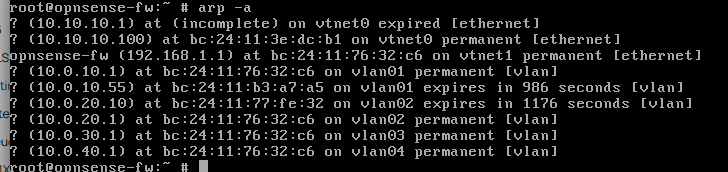
10.10.10.1 showing as (incomplete) on vtnet0. OPNsense had been sending those ARP requests and MikroTik had never responded to a single one.
Fixing it required coordinated changes across three devices. Order mattered because a mistake at any step would cut management access entirely.
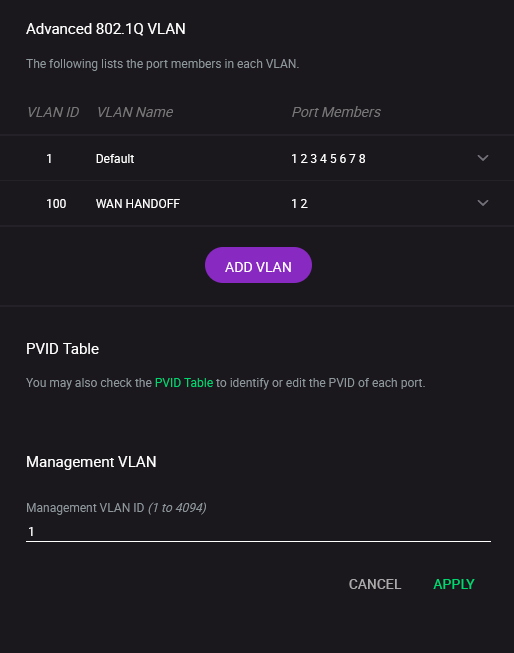
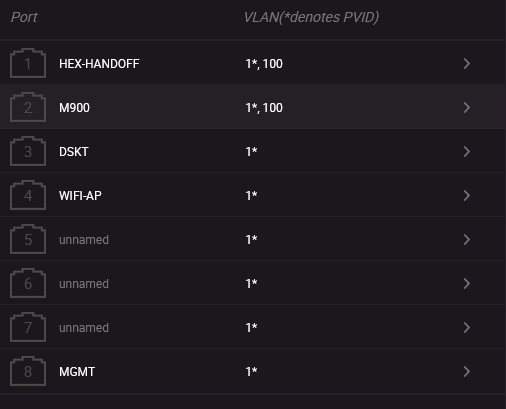
Netgear first. Added VLAN 100 to the 802.1Q VLAN table with ports 1 (toward MikroTik) and 2 (toward Proxmox) as tagged members. PVID on both ports stays at 1 so untagged management traffic continues to flow normally on VLAN 1.
MikroTik second. RouterOS 7 on the hEX supports bridge VLAN
filtering in hardware. Added VLAN 100 to the bridge VLAN table with
ether2 and bridge as tagged members, then enabled filtering.
Adding bridge itself as a tagged member is critical. Without it,
MikroTik’s CPU cannot participate in the VLAN 100 domain and will
not respond to ARP requests arriving tagged on that VLAN.
/interface bridge vlan add bridge=bridge tagged=ether2,bridge vlan-ids=100
/interface bridge set bridge vlan-filtering=yes
OPNsense WAN last. Rather than keeping the WAN on
10.10.10.100/24 which would put it on the same subnet as the
physical management network even with VLAN tagging, I moved it to a
dedicated point-to-point /30. MikroTik gets 10.10.100.1/30 on a
vlan100-wan interface parented on the bridge. OPNsense gets
10.10.100.2/30 as its WAN IP with 10.10.100.1 as the gateway.
Confirmation came from tcpdump during a ping from OPNsense to MikroTik’s new gateway. Both directions, both tagged VLAN 100, ARP completing cleanly across a properly segmented WAN handoff link for the first time.
The Firewall
Before writing rules I had to decide what I was actually simulating. The easy path is giving Kali direct access to everything and running GOAD exploits against the domain. That works. It also skips the most interesting part of real adversary tradecraft: the pivot.
Real breaches do not start with an attacker already on the internal network. The 2019 Capital One breach is the reference case. A misconfigured WAF on AWS had an IAM role with excessive permissions. The attacker did not break through the firewall. They tricked the WAF into relaying requests to the internal metadata service, collected its temporary credentials, and used those to drain S3 buckets containing 106 million customer records. The firewall was never bypassed. The attacker worked within permitted traffic flows and the trusted relationship between the WAF and the backend was the entire attack path.
That is what this lab is designed to practice. Kali is an internet attacker. It can only reach what the internet sees. If it wants to touch Active Directory, it must earn it through the DMZ foothold.
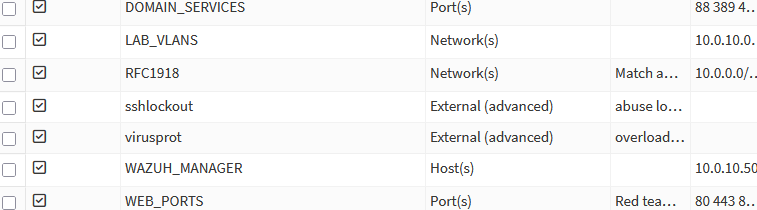
Aliases
Readable rules are debuggable rules. I created five aliases before touching the rule editor:
RFC1918 covers all private IP ranges. Used inverted (!RFC1918)
in egress rules to mean the internet without hardcoding WAN
interfaces.
LAB_VLANS covers all four lab subnets. Used in catch-all block
rules at the bottom of every interface.
WAZUH_MANAGER is a host alias for 10.0.10.50. Scopes Wazuh
agent traffic to the exact destination IP, not the entire Detection
VLAN.
WEB_PORTS is a port alias for 80, 443, and 8080. Scopes Red Team
access to DMZ web services only.
DOMAIN_SERVICES covers ports 1433, 389, 636, 445, 88, and 135.
The exact ports legitimate DMZ-to-domain communication uses and the
common ports a threat actor abuses after compromising a DMZ host.
That overlap is the whole point.
Floating rules
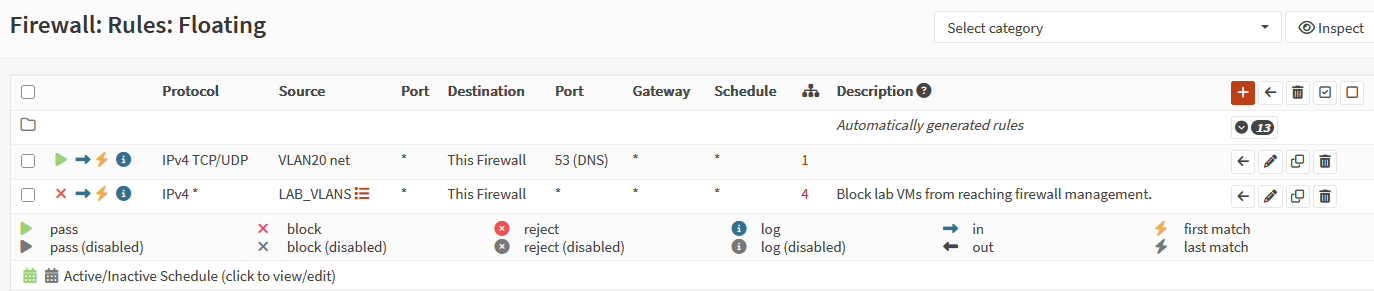
Two floating rules, evaluated before any per-interface rules fire.
One blocks LAB_VLANS from reaching This Firewall. Quick
match enabled. A threat actor who can reconfigure the firewall can
disable every other control in the lab. One rule closes that path
permanently.
The other passes TCP/UDP port 53 from VLAN 20 to This Firewall,
positioned above the block rule. This one I added after discovering
that the block rule was silently killing every DNS query Kali sent.
DNS queries to 10.0.20.1 terminate on the firewall itself and hit
the block before Unbound ever sees them. Quick match enabled here too,
so it wins the evaluation race against the block rule below it.
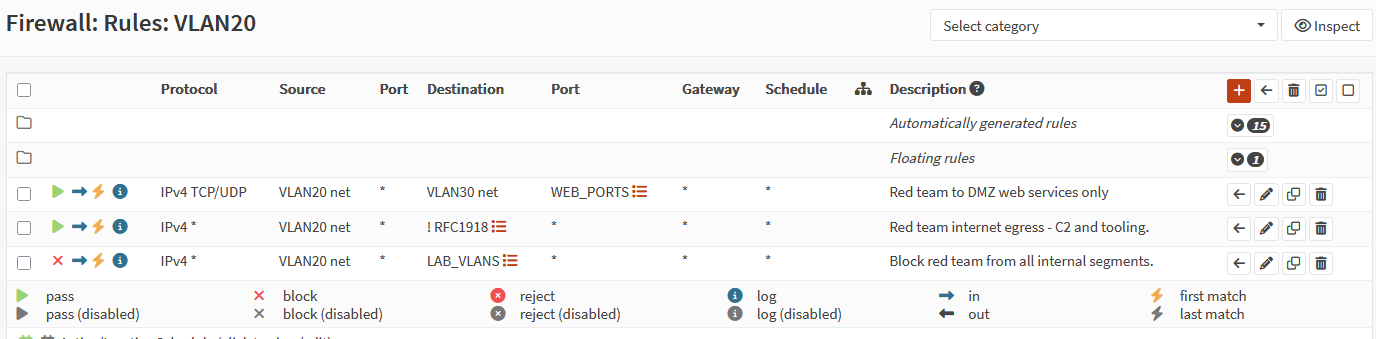
VLAN 20 — Red Team
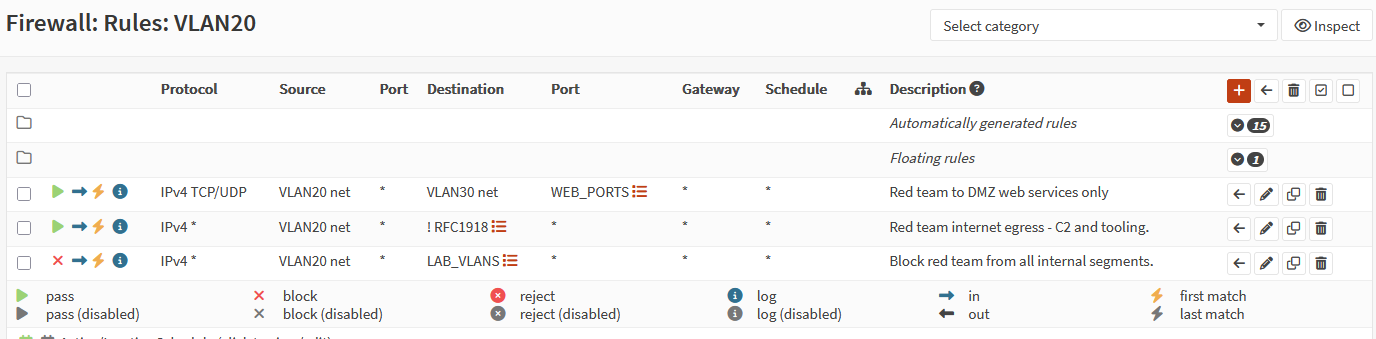
Three rules. Kali reaches DMZ web services on WEB_PORTS, gets
internet egress via !RFC1918 for C2 callbacks and tool downloads,
and everything else gets blocked. No direct path to the domain.
VLAN 30 — Pivot / DMZ
Four rules. This interface is where the attack chain actually lives.
A compromised DMZ host can call back to Kali’s C2 on VLAN 20. It
can reach VLAN 40 on DOMAIN_SERVICES ports only, which mirrors the
legitimate trust relationship a real web application has with its
backend. A threat actor who owns the DMZ host inherits those permitted
paths. The firewall does not stop them. Wazuh has to.
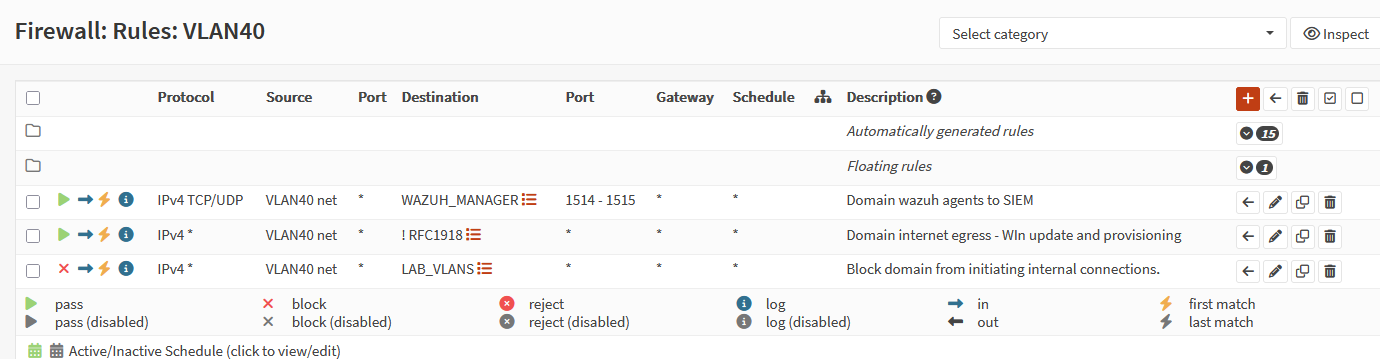
VLAN 40 — Windows Domain
Three rules. Wazuh agents phone home to WAZUH_MANAGER on ports
1514 to 1515. This rule goes first because agent traffic to
10.0.10.50 is a private IP and would be blocked by the !RFC1918
egress rule if order were reversed. Specific before general. Windows
Update gets internet egress. Everything else to LAB_VLANS gets
blocked.
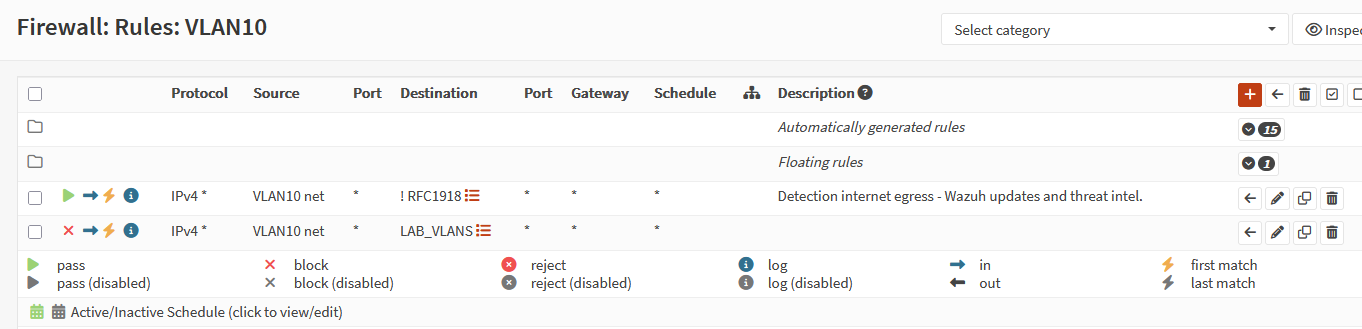
VLAN 10 — Detection
Two rules. Internet egress for Wazuh updates and threat intel feeds. Catch-all block for everything else.
End-to-End Connectivity
With rules in place the next step is confirming the full traffic path works end to end.
MikroTik static route
One route makes the entire lab reachable from the physical management network. Without it, any packet destined for a lab VM exits toward the ISP and never comes back. LPM handles the overlap with the ISP subnet safely since 10.0.0.0/24 is more specific than the /8.
Dst. Address: 10.0.0.0/8
Gateway:      10.10.100.2

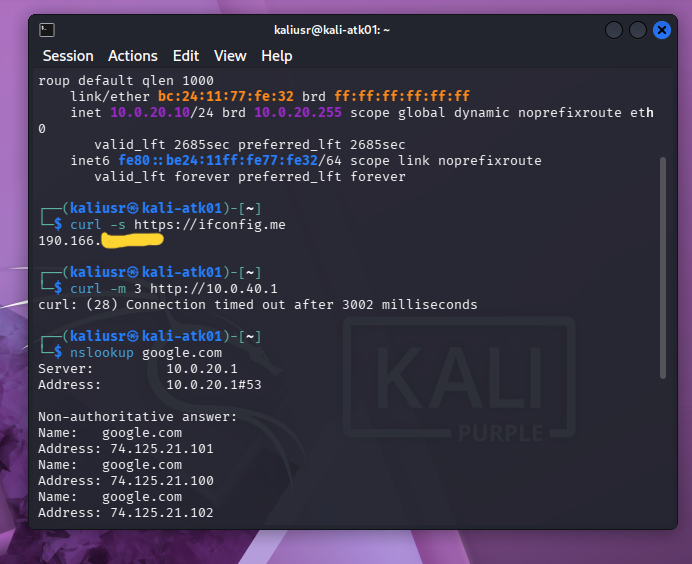
Connectivity test from Kali
Three tests, three results.
curl -s https://ifconfig.me returned the lab’s public IP. The full
path from VLAN 20 through OPNsense NAT, through MikroTik, and out
to the ISP is confirmed. Double NAT from the Claro modem does not
affect outbound traffic.
curl -m 3 http://10.0.40.1 timed out after three seconds. Kali
has no direct path to the Windows domain. The block rule is
enforcing the segmentation.
nslookup google.com resolved correctly through 10.0.20.1. The
floating DNS pass rule is working. Browser works.
What Comes Next
Worth noting: the architecture post has two items that need updating
to match reality. VLAN 100’s subnet is now 10.10.100.0/30, not
10.10.10.0/24. The MikroTik static route gateway is now
10.10.100.2, not 10.10.10.100. The design intent was always
correct. The implementation just took a few extra hours and acetaminophen for the troubleshooting-induced migraine to catch up to it.
Next post goes straight into the attack chain: GOAD Lite for the Windows domain, Wazuh for detection, and the first end-to-end pivot run from internet attacker to domain lateral movement. That is what all of this was for.
Thanks for your time. ★
ER